Most people think google_product_category tells Google what a product is. It doesn't. It corrects what Google already decided.
So google_product_category works in three steps:
- Google categorises every product on its own. Whether or not you send google_product_category, each product gets assigned a node from Google's taxonomy automatically.
- It decides from your content. Titles, descriptions, brand, pricing, and GTIN are what Google reads to make that assignment. Clean, on-topic data pushes it toward the right node.
- google_product_category overrides the guess. The attribute exists to correct Google when its automatic assignment is wrong. You're not filling in a blank label. You're vetoing a decision already made.
What changed
Product structured data now supports a category property. Two ways to use it, and you can use both in the same array:
- Plain text. Your own classification, which Google describes as the equivalent of the product_type feed attribute. Google recommends keeping it under 750 characters.
- CategoryCode. A structured object pointing at Google's Product Taxonomy, equivalent to google_product_category. Set inCodeSet to the taxonomy URL and codeValue to the numeric ID or the full path.
"category": [
{
"@type": "CategoryCode",
"inCodeSet": "https://www.google.com/basepages/producttype/taxonomy-with-ids.en-US.txt",
"codeValue": "2271"
},
"Special Occasion > Wedding & Bridal Party Dresses"
]
Recommended, with no ranking claim attached to it.
Why should you care?
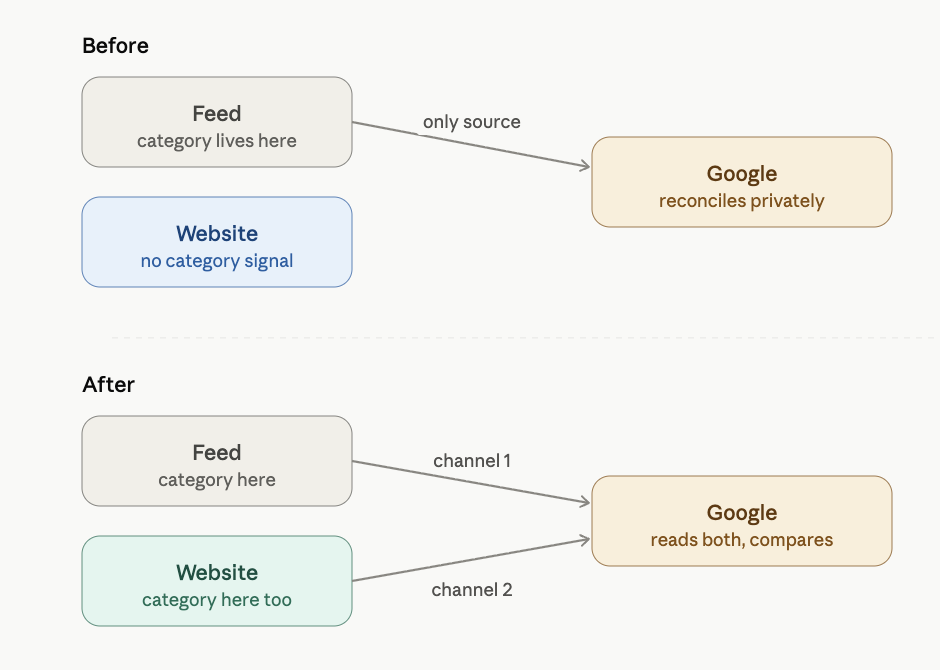
Until now, the category you declared to Google lived only in the feed, a file most of the business never sees.
Your category data and your website were two separate stories, and when they disagreed, Google reconciled them privately.
This property moves that data onto the page itself, in a format Google reads directly. For the first time, the classification is visible in the same place your product actually lives, which means the gap between what the feed claims and what the site shows becomes something you can see and fix, instead of something buried in an export.
The concrete upside, and the limit. A clean, consistent category signal across feed and page gives Google a more reliable read of what you sell, which is what governs the auctions you compete in, the shopping surfaces you qualify for, and increasingly how AI-driven search understands your catalogue.
What it does not buy you is a direct ranking lift, and anyone promising one this early is guessing.
The value is accuracy and control, not a lever you pull for traffic.
One more attribute made the same trip. The update also documents sale duration on the page: validFrom, validThrough, and priceValidUntil, in ISO 8601, the on-page counterpart of sale_price_effective_date.
Price, availability, and condition crossed from feed to page years ago.
Category and sale dates are the latest, and the pattern is the point: the feed and the website are converging into two channels describing the same object, and Google reads both.
Google Guide.
Tip 1: check how deep your GPC values go
Google's taxonomy is a hierarchy, and the same product can be declared at more than one level of its own branch. Using Google's own example value:
Level 1: Apparel & Accessories
Level 2: Apparel & Accessories > Clothing
Level 3: Apparel & Accessories > Clothing > Dresses (ID 2271)
PS. Google Taxonomy
All three are valid values for a dress.
The right one is level 3, because that's where the branch ends and Google's spec asks for the most specific category that applies.
In other verticals, the most specific node sits at level 4 or 5, so the target is the leaf of your branch rather than a fixed number.
Validation accepts all three, which is why shallow values survive for years.
Why they happen
Nobody fills a feed product by product.
With 4,000 SKUs you write an export rule: if a product sits in X, write Y intogoogle_product_category.
Each line like that is a rule, and the number of rules you can write depends entirely on the input you pick.
The developer writing the export needs an input that already exists on every product, already structured, already clean.
The site's navigation tree is the obvious candidate. So if the nav has eight top-level categories, the mapping has eight branches:
Eight rules, five distinct values.
A dress, a shirt, a coat and a pair of pyjamas all enter through "Women" and all leave as Clothing, because the rule has nothing else to separate them with.
It ships, it validates, products get approved, and nobody looks again.
How to check it
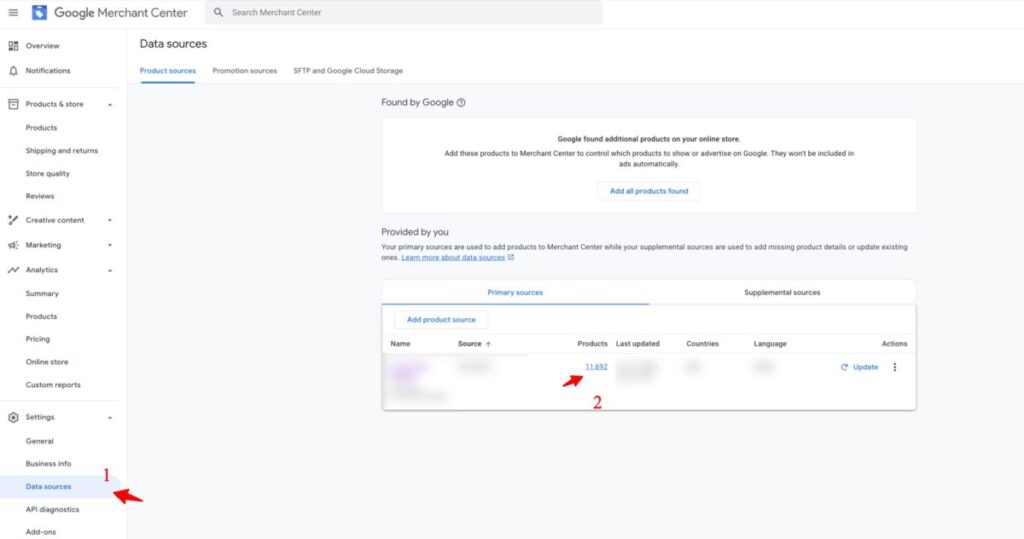
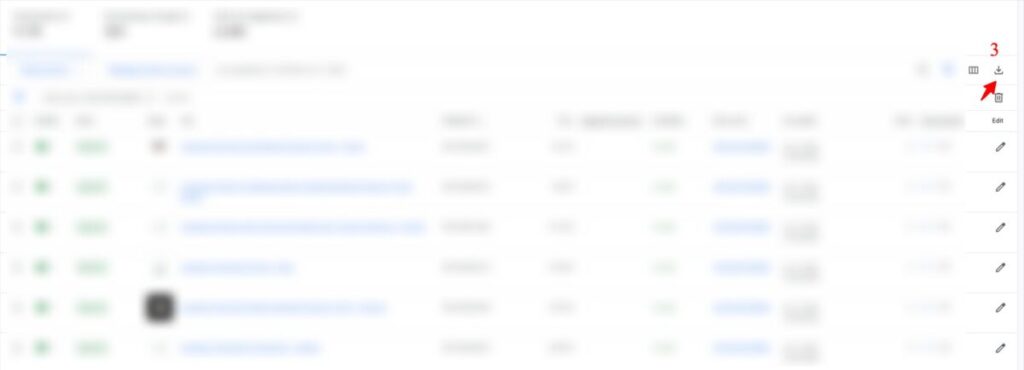
Go to Google Merchant Center and follow my steps.
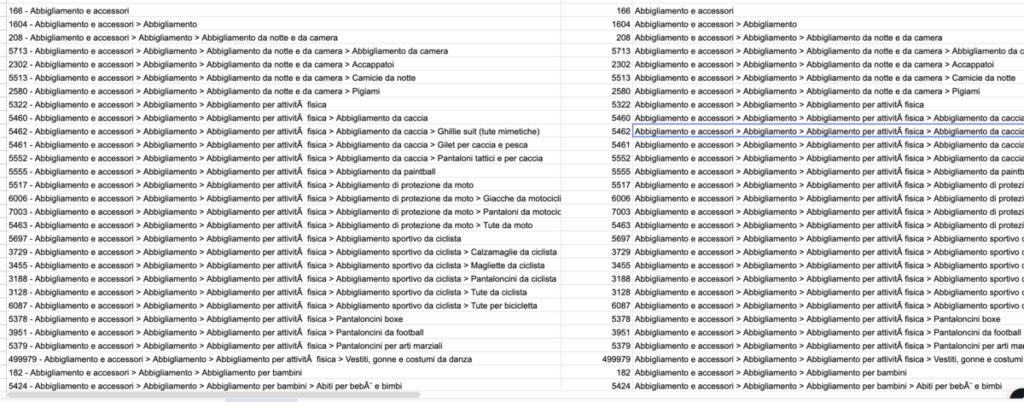
Then, import into Google Sheets.
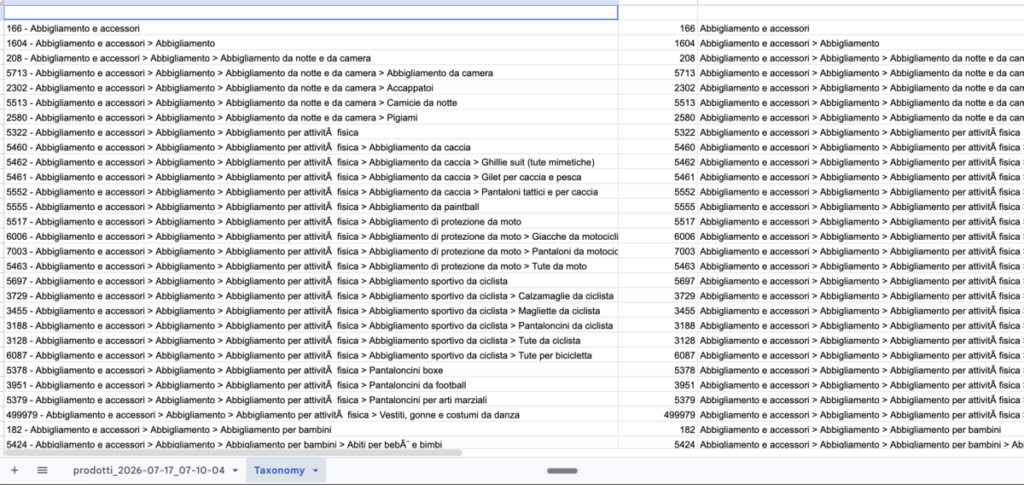
Copy and paste the Google taxonomy into a new sheet.
In the first sheet, you should have your product information.
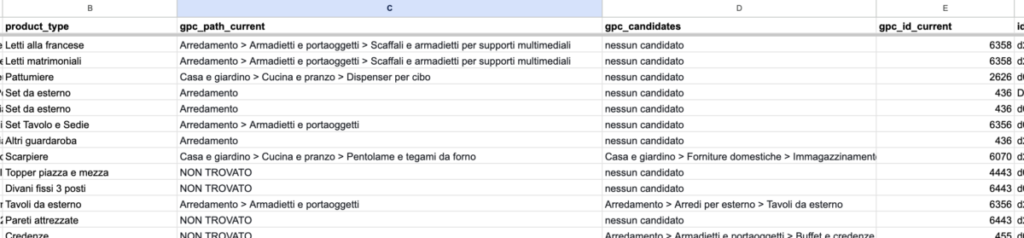
I show you an example of my analysis.
The columns:
- Column B (product_type): the client's own category label.
- Column C (gpc_path_current): the numeric google_product_category value from the Merchant Center export.
- Column D (gpc_candidates): column E resolved into a readable path by joining against Google's taxonomy file. NON TROVATO means the ID isn't in the file at all.
- Column E (gpc_id_current): taxonomy nodes matching a keyword, to shortlist options before choosing. The choice stays human.
I used a different formula to split the Google Sheet into two pages; in the second, you need to paste all Google taxonomies.
What this gets you
- A remediation file. Filter gpc_id_current <> gpc_id_correct and you have the list to hand the client: their label, what the feed says today, what it should say. A ticket someone can execute without understanding taxonomies.
- The ghost IDs. NOT FOUND means the value isn't in Google's list at all. Nothing in Merchant Center flags this. Those SKUs submit a category that doesn't exist.
- The wrong branches. Reading product_type against gpc_path_current, the failures announce themselves. A bedside table sitting under serving dishes is visible in a second. Google documents that some categories impose extra required fields, so a wrong branch means being measured against someone else's requirements.
- The shape of the mistake. Values at level 1 means nobody finished the mapping. Values that are deep, consistent and wrong the same way every time means somebody mapped it with a broken table. Different conversations with the client, and you can't tell them apart before you run this.
The taxonomy file is free, and the export is two clicks.
If you need this specific analysis, please contact me at simoneparodi@searchind.com.
Tip 2: spot-check the loaded branches
Wrong branch is a different failure from shallow.
Shallow is vague, and Google mostly shrugs.
Wrong branch is confident and incorrect, so it gets acted on: your products are evaluated against rules that govern a category you don't sell in.
You get a disapproval whose message describes a policy you've never dealt with, and category appears nowhere in that message.
- Supplements against food. A protein powder filed under food items rather than vitamins and supplements sits outside the healthcare review path it belongs in. It's fine until it isn't, and by then you're arguing about products that have been live for months.
- Kitchen tools against hunting and sporting goods. Knives, axes, machetes. A mapping rule built on the word "knife" in the title files half of them in a branch carrying restrictions the other doesn't.
Start with your largest buckets. A category holding 3,000 products is a rule, and a wrong rule is wrong 3,000 times.
Tip 3: repair the source before you add another output
Category gets expressed in at least four places, each generated by a different system:
Four systems, four answers, and no moment in the release process where anyone puts them side by side.
Calling this drift implies there was a point of alignment to drift away from.
The nav tree is built for humans browsing a shop: "Party", "New In", "Under €50". Those are merchandising decisions that change every season.
The GPC mapping was built to satisfy a validator.
The PIM codes predate the current website and encode warehouse logic.
Each was correct for its own purpose on the day it was made, and nothing reconciles them afterwards because nothing was asked to.
Adding a category to your schema while the feed and the page already say different things fixes nothing.
You just publish the same mistake in one more place.
The solution is to pick one system as the single source for category, usually the PIM, and have the feed, the schema and the breadcrumb all read from it, leaving the breadcrumb free to use commercial names without the schema mistaking them for GPC.
In practice, don't ask anyone to rebuild the PIM. Ask only that the schema read from the same source as the feed: a bounded ticket a developer will accept, whereas "reconcile the taxonomy across four systems" dies in the backlog.
Tip 4: ship sale duration this week
Cheap, and unrelated to the category work, so it doesn't have to wait for it.
- validFrom: when the price starts being valid
- validThrough: when it stops
- priceValidUntil: the date after which the price is no longer available
"offers": {
"@type": "Offer",
"price": "89.00",
"priceCurrency": "EUR",
"validFrom": "2026-07-20T00:00:00+02:00",
"priceValidUntil": "2026-08-31T23:59:59+02:00"
}
Google's guidance: provide both a start and an end, keep the start earlier than or equal to the end, include time and timezone.
Put validFrom and validThrough or priceValidUntil on the Offer node when the Offer price is the active sale price.
If the sale price sits in a PriceSpecification node (typical when a strikethrough price is present), put validFrom and validThrough on that node instead, since priceValidUntil doesn't apply to PriceSpecification.
The failure mode is documented by Google directly: a listing may not display if priceValidUntil indicates a past date.
Past dates come from templates that hardcoded a value, or from a plugin that stamps "today plus 30 days" at build time on a site that hasn't rebuilt in six weeks. The product is fine, the price is fine, the listing is gone.
Open your PDP source, find priceValidUntil, and check whether the date is in the past. Ten seconds, highest yield in this article.
If you want to grow your eCommerce SEO seriously with an SEO partner like me, contact me at simoneparodi@searchind.com.